Text Generation
For Research Use Only
The text generation feature produces template-based output for research and educational purposes. Generated text is not validated for clinical use and must be independently reviewed and verified by qualified professionals before use in any clinical context.
The Scenario
This example demonstrates the text generation workflow using HFE (hereditary hemochromatosis) as a sample gene. It covers setting up a calculation, selecting a text perspective, generating German-language output, and customizing the template.
Using the Calculator
Setting Up with HFE
Search for HFE and allow the variant table to load. Unlike CFTR - where dozens of variants meet the automatic inclusion criteria - HFE typically shows a small number of qualifying variants.
For HFE, the two commonly discussed variants are:
- C282Y (p.Cys282Tyr) - the primary variant associated with HFE-related hemochromatosis
- H63D (p.His63Asp) - associated with mild iron overload, particularly in compound heterozygosity with C282Y; significance in isolation is debated
Review the variant table and activate or deactivate variants as needed. You may choose to include both C282Y and H63D to see the combined carrier frequency, or limit the calculation to C282Y only.
Selecting a Perspective
Set the patient status to Heterozygous carrier. Then, in the results view, select the Healthy Carrier perspective for text generation.
The three perspectives produce different text:
| Perspective | Context | Text content |
|---|---|---|
| Affected Patient | Two pathogenic variants identified | Describes the inheritance pattern and recurrence risk |
| Healthy Carrier | One pathogenic variant identified | Explains carrier status and includes population frequency context |
| Family Member | Relative of an identified carrier | Describes the rationale for cascade testing |
Generating German Text
Select German as the output language, then choose the gender-inclusive style:
- Asterisk (*) - Träger*in - widely used in German-language writing
- Colon (😃 - Träger:in - accepted in official contexts
- Slash (/) - Träger/in - traditional alternative form
- Traditional - Trägerin und Träger (long form) - explicit dual form
The generated text uses your calculation results automatically - the carrier frequency, recurrence risk, gene name, and data source are substituted into the template wherever the corresponding placeholders appear.
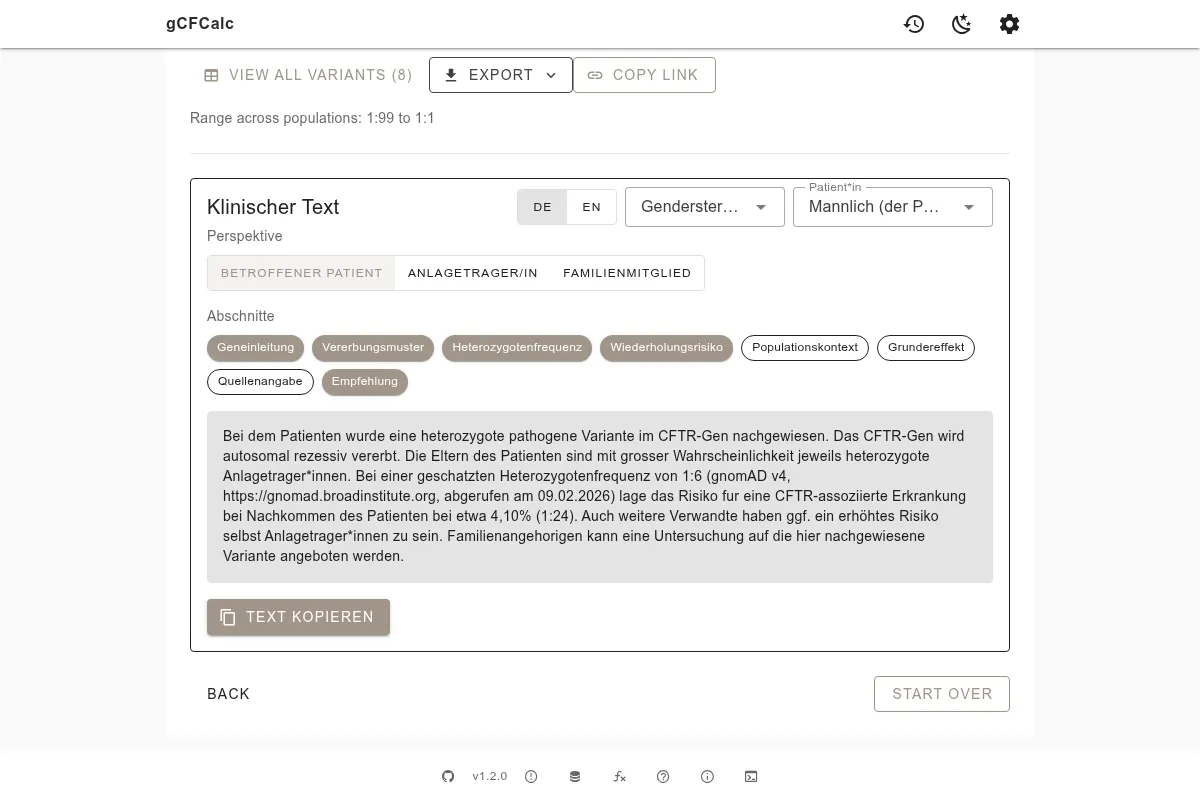
The output in English uses a similar structure:
"A heterozygous pathogenic variant in the HFE gene was identified. Based on data from gnomAD v4.1, the carrier frequency for pathogenic variants in HFE is approximately X% (1:Y). For a known carrier, the probability that a partner of the same ancestry also carries a pathogenic HFE variant is equal to the population carrier frequency."
Template Customization
You can control which sections appear in the generated text through the template editor (click the settings icon). The available sections are:
- geneIntro - Introduction to the gene and condition
- inheritance - Autosomal recessive inheritance pattern
- carrierFrequency - The calculated carrier frequency
- recurrenceRisk - The recurrence risk given the status
- populationContext - Notes on population-specific variation
- founderEffect - Founder effect explanation (if relevant)
- sourceCitation - gnomAD version, dataset, and access date
- recommendation - Follow-up recommendation
See the Templates reference for the complete variable reference and guidance on customizing template text.
Copying the Text
Click the copy button above the generated text to copy it to your clipboard. The source citation section (if enabled) automatically includes the gnomAD version, population dataset, and access date.
WARNING
Generated text is a starting point for research documentation only. It must be reviewed, edited, and verified by qualified professionals before any use in a clinical or patient-facing context.
Try It Yourself
Generate clinical documentation text for your gene of interest:
See Also
- Templates - Full variable reference, section descriptions, and customization guide
- Carrier Screening - CFTR-specific carrier screening workflow with variant exclusion
- Getting Started - Basic calculator walkthrough for new users